Photorealistic 3D interior models for rendering
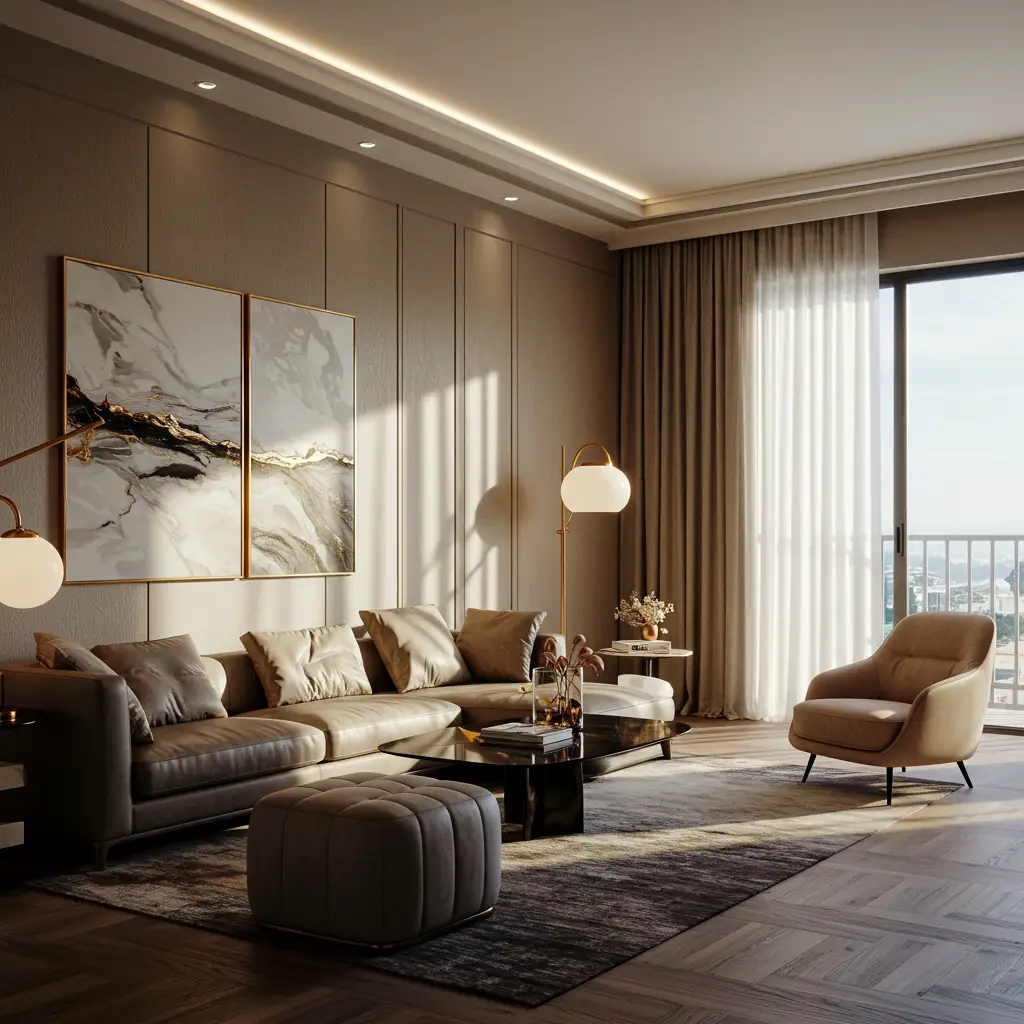
Photorealistic 3D Interior Models for Rendering: The Ultimate Guide 🏡✨
If you’re an architect, interior designer, or 3D artist, you know that photorealistic 3D interior models can make or break your renders. But what makes a 3D model look real? And where can you find high-quality, downloadable 3D furniture models to elevate your projects?
In this guide, we’ll break down everything you need to know—from what makes a render lifelike to where to snag the best assets. Let’s dive in!
Why Photorealistic 3D Interior Models Matter 🎨
Photorealistic renders aren’t just eye candy—they’re powerful tools for:
✅ Client presentations – Show, don’t just tell.
✅ Marketing & real estate – Sell spaces before they’re built.
✅ Virtual staging – Furnish empty rooms digitally.
✅ Game & film design – Create immersive environments.
But how do you achieve that ultra-realistic look?
Key Elements of Photorealistic 3D Renders 🔍
| Element | Why It Matters | Tips |
|---|---|---|
| Lighting 🕯️ | Mimics real-world shadows & highlights | Use HDRI lighting + area lights |
| Textures 🖼️ | Adds surface detail (wood grain, fabric weave) | Use PBR materials (Physically Based Rendering) |
| Geometry 📐 | Clean, optimized meshes prevent glitches | Avoid overly complex polygons |
| Shadows 🌑 | Soft, natural shadows enhance realism | Adjust light falloff & bounce |
| Reflections ✨ | Surfaces like glass & metal need accurate reflections | Use ray tracing if possible |
Where to Find Downloadable 3D Furniture Models 🛋️
Want to skip modeling from scratch? Here are the best sources for high-quality 3D furniture models:
1. Free Resources (Best for Beginners)
-
- SketchUp Warehouse – Great for basic models.
- TurboSquid Free Section – Occasional gems.
- CGTrader Freebies – Some high-poly options.
2. Premium Marketplaces (For Pro-Level Work)
-
- 3Dsky – Huge library of interior assets.
- Design Connected – Luxury furniture models.
- Evermotion – Detailed, ready-to-render scenes.
💡 Pro Tip: Always check polygon count and texture resolution before downloading!
Common Questions About Photorealistic 3D Interiors ❓
Q: How long does it take to render a photorealistic interior?
A: Depends on complexity! A simple room might take 10-30 minutes, while a detailed scene with ray tracing can take hours.
Q: Which software is best for photorealistic renders?
A: Top picks:
- Blender (Free + Cycles Renderer)
- 3ds Max + V-Ray
- Unreal Engine (Real-time rendering)
Q: Can I use AI to speed up rendering?
A: Yes! Tools like NVIDIA’s DLSS and AI denoisers help reduce render times while keeping quality high.
Final Thoughts: Make Your Renders Pop! 🚀
Photorealistic 3D interior models are a game-changer—whether you’re pitching to clients or creating virtual worlds. By focusing on lighting, textures, and high-quality downloadable 3D furniture models, you can turn bland renders into jaw-dropping visuals.
Now go forth and render like a pro! 🎨💻
Want More? Check Out These Resources:
🔗 Best 3D Model Marketplaces
🔗 Free PBR Texture Libraries
🔗 Lighting Tips for Realistic Renders
Advanced Tips & Tricks for Next-Level Photorealistic Renders 🚀
Now that we’ve covered the basics, let’s take your photorealistic 3D interior renders to the next level with some pro techniques and insider secrets.
1. The Magic of Post-Processing ✨
Even the best 3D renders can benefit from a little photoshop love. Here’s how to enhance realism in post-production:
-
Color Grading – Adjust hues and contrast to match real-world lighting.
-
Lens Effects – Add subtle bloom, glare, or vignetting for a cinematic feel.
-
Depth of Field – Blur distant objects slightly (just like a real camera).
-
Grain & Imperfections – A tiny bit of noise makes CGI feel more organic.
💡 Pro Tip: Use Adobe Lightroom presets for quick, consistent color correction!
2. Realistic Materials: Beyond Basic Textures 🧱
Not all materials are created equal. To make surfaces feel real:
| Material | Key Properties | Software Tricks |
|---|---|---|
| Fabric 🛋️ | Fuzziness, weave patterns | Use displacement maps for depth |
| Wood 🪵 | Grain direction, glossiness | Mix roughness maps for variation |
| Metal 🔩 | Scratches, fingerprints | Add micro-surface details |
| Glass 🥃 | Imperfections, refraction | Use caustics for light bending |
🔍 Try This: In Blender, use the Principled BSDF shader for ultra-realistic materials.
3. Optimizing Your Workflow ⚡
Slow renders killing your productivity? Speed things up with these hacks:
✅ Proxy Models – Use low-poly versions while working, swap in high-poly for final render.
✅ Render Layers – Separate foreground/background to tweak lighting faster.
✅ GPU Rendering – If your software supports it (like Octane or Redshift), GPU rendering is much faster than CPU.
⏱️ Benchmark Test: A scene that takes 2 hours on CPU might render in 20 mins on a good GPU!
4. Staging Like a Pro: Composition & Storytelling 🎭
A photorealistic render isn’t just about tech—it’s about emotion and storytelling.
Do’s & Don’ts of Interior Staging
| Do ✅ | Don’t ❌ |
|---|---|
| Add “imperfections” (wrinkled pillows, slightly open drawers) | Make everything too clean & sterile |
| Use real-world scale (sofas, tables, ceiling height) | Stretch or distort proportions |
| Layer lighting (ambient + accent + natural light) | Rely on just one light source |
| Include “life elements” (books, coffee cups, plants) | Leave surfaces empty & boring |
🏆 Pro Move: Study real estate photography for inspiration on natural staging.
5. Future Trends in 3D Interior Rendering 🔮
The world of CGI is evolving fast! Here’s what’s coming:
-
AI-Powered Rendering – Tools like NVIDIA’s AI Denoiser cut render times in half.
-
Real-Time Ray Tracing – Engines like Unreal Engine 5 make Hollywood-quality renders instantly.
-
VR Walkthroughs – Clients can explore photorealistic spaces in VR before construction.
🚀 Are You Ready? Start experimenting with Unreal Engine’s Lumen lighting for a glimpse of the future.
Final Checklist Before You Render ✔️
Before hitting that render button, ask yourself:
-
☑️ Are materials PBR-based?
-
☑️ Is lighting balanced & natural?
-
☑️ Did I add subtle imperfections?
-
☑️ Are camera settings realistic (focal length, DOF)?
-
☑️ Have I optimized the scene for speed?
If you checked all these… go ahead, your render will look 🔥!