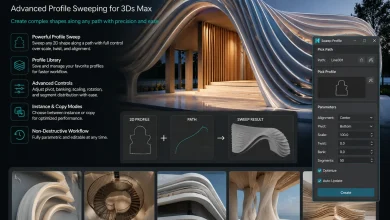
3d-kstudio – Sweep Profile Pro v1.01.45 for 3ds Max

Download 3D-Kstudio – Sweep Profile Pro v1.01.45 for 3ds Max 💯✨
Hey there, fellow 3D artist! 👋 Let’s be real for a second. We all love creating stunning architectural visualizations, but nobody enjoys the tedious, repetitive task of modeling complex cornices, skirting boards, and wall moldings from scratch. It kills your creative vibe, right? 😩
Well, get ready to make your workflow a whole lot smoother because today we are diving deep into a total game-changer: 3D-Kstudio Sweep Profile Pro v1.01.45. This little powerhouse script for 3ds Max is basically your new best friend for creating architectural profiles with insane speed and zero headaches. Let’s break down how to master it. 🚀
3d-kstudio – Sweep Profile Pro v1.01.45 for 3ds Max
This content is restricted to paid subscribers
📚 What is Sweep Profile Pro and Why Do You Need It?
In simple terms, the ability to create architectural profiles with ease and precision is a valuable asset for any archviz artist. One of the tools that enable this is the Sweep Pro script from Kstudio. This tool allows users to easily create architectural moldings when modeling a 3D scene of an interior or exterior.
But here is the kicker: The PRO version contains 37 ready-to-be-used architectural profiles. That is right, 37! 🎉 We are talking about classical cornices, modern minimalist baseboards, elegant crown moldings, and much more. You do not need to draw a single spline shape manually. Just pick, click, and boom, you have a gorgeous, parametric profile sweeping along your walls. It is not just a script; it is a massive time-saver and a creative booster. 🛠️
Key Features That Will Make You Fall in Love 😍
Let’s break down the coolest parts of Spline Flow, the features that will genuinely transform your modeling workflow.
1. Effortless Parametric Flow 🌊
The core magic is in the name. You define a path, and then you can assign different spline shapes along that path. Its primary feature is the generation of splines that smoothly flow from one to the other and follow a specific path. That in turn allows the formation of complex objects. The transition between shapes is buttery smooth, giving you organic, continuous surfaces that would be a nightmare to model manually.
2. Total Control Over Distribution & Curvature 🎛️
The notable strength of Spline Flow lies in its ability to control the distribution and curvature of these splines. You are not just along for the ride; you are in the driver’s seat. You can precisely dictate where each shape influences the model, how dense the spline network is, and how sharp or smooth the curves are. This level of granular control is what makes professional, polished results possible.
3. Bring Your Models to Life with Animation 🎬
Static models are great, but animated ones tell a story. One of the standout aspects of Spline Flow is its animation capabilities. Users are not restricted to designing static models; they can breathe life into their creations by animating various parameters. Want the cross-section of a column to morph and twist over time? Just keyframe the parameters. From subtle movements to significant transformations, this plugin opens a new realm of possibilities, enhancing the dynamic elements and realism of the parametric objects. Imagine showing a client an architectural element gracefully morphing into its final form—that’s the “wow” factor right there. 🤯
4. A Genius Modular Approach for Real-World Design 🏗️
This is a feature that truly sets it apart for fabrication and real-world assembly. An essential feature of Spline Flow is its representation of splines as sections of the parametric elements that can be manufactured and assembled to form a complete object. Think of it like a very sophisticated 3D puzzle. This modular approach greatly enhances design flexibility and convenience. You can design each “rib” or “section” of an object, knowing it can be flattened, cut, and assembled later. This unique feature streamlines the design process and helps modify the final 3D model with ease. For product and furniture designers, this is pure gold! 🥇
🚀 How to Install Sweep Profile Pro (Step-by-Step)
Before we get to the fun part, let’s get this tool inside your 3ds Max safely. Do not worry, it is super easy! Just follow these steps like a cooking recipe. 🍳
-
Unzip the File: First, extract the downloaded archive. You will find the main script file (usually with an
.mzpor.msextension) and the folder containing those precious 37 profiles. -
Drag and Drop Magic: Open 3ds Max. Simply drag the
.mzpfile from your folder directly into the 3ds Max viewport. Boom! A dialog box might pop up asking for confirmation; just hit “Install”. 🪄 -
Locate the Script: If you are using the
.msversion or prefer a manual setup, go to the top menu:Scripting>Run Script, find the file, and open it. -
Customize Your UI (Recommended): To make your life easier, let’s put the script in a permanent spot. Go to
Customize>Customize User Interface>Toolbars> Category:3D-Kstudio. Find “Sweep_Profile_PRO”, drag it to a toolbar, and create an icon for it. Now it is always one click away! 🖱️
Lite vs PRO Version: Which One is for You? ⚖️
Choosing the right version is important. Here is the simple, no-nonsense breakdown:
Spline Flow Lite is fully functional for learning and simpler projects but comes with sensible limits.
-
Shape Limit: Can contain only 2 shapes. Perfect for simple transitions.
-
Animation: Cannot be animated. It is for static designs only.
-
Compatibility: Users of the Lite version can still open and render Spline Flow objects created in the PRO version, but without the ability to edit them. Animations created in the PRO version will also be preserved when opened in the Lite version and will render fine.
Spline Flow PRO is the full, unleashed beast for professionals. 💪
-
No Limits: The object might contain more than 2 shapes, allowing for incredibly complex, multi-stage morphing.
-
Full Animation: Animate any parameter to create dynamic, mind-bending effects.
-
Pipeline Ready: This is the version you need for serious commercial work and advanced design exploration.
Rendering/Network Rendering Tip: For rendering, whether on a local machine or a farm, you can use the Lite version without any limitations. This means you only need one PRO license for your main workstation to create, and your render nodes can rock the free Lite version. Huge cost-saver! 💰
⚙️ Pro Tips and Workflow Hacks for True Masters
Want to go from beginner to power user? I got you. 😉
-
Layering is Key: Do not try to use one profile for everything. Real-world architecture uses layers of moldings. Sweep a baseboard first, then a chair rail, then a complex crown molding made of two separate sweeps. This creates incredible realism and depth.
-
Combine with the “Bend” Modifier: Got a curved Victorian window? No sweat. Create your sweep, then pop a Bend modifier on top to adjust it to arched openings perfectly.
-
Tweak the Settings: Inside the script, play with the position offsets. You can slide the profile inwards or outwards relative to the spline path. This is a lifesaver for aligning a cornice precisely with a ceiling edge.
-
Create Your Own Library: Did you make a custom profile you love? Save it! This tool is not just a player; it is a creator. Build your own signature library of profiles for future projects to maintain a consistent style across your portfolio. 🌟
Watch It in Action! 🍿
A detailed video tutorial from VizCourse is the perfect companion to this plugin. Check out the official walkthrough by searching for:
Spline Flow – Parametric Spline Modeling Plugin – #3dmax #3dmodeling #archviz
Watching the tool in action will click everything into place and spark a thousand ideas. 🚀
In Conclusion… 🏁
Spline Flow enables designers to generate correlated splines along a defined path effortlessly, and it is destined to become an indispensable tool in the 3D modeling toolkit. Stop wrestling with manual topology for organic, flowing forms. Embrace the parametric revolution, download Spline Flow Pro v0.9.166.96, and start creating the kind of fluid, complex designs that were once just a “what if.” Happy modeling, and may your splines always flow smoothly! 🌊😉
Grab your download now and inject some architectural elegance into your scenes today! Happy rendering! ✨🏠