[Download] Sliding / Stacking Door Generator v2.0 for 3ds Max
Download Sliding / Stacking Door Generator v2.0 for 3ds Max 🚪✨
Hey there, fellow 3D artist! 👋 Are you tired of modeling sliding doors from scratch every single time? Yeah, me too. It is one of those tasks that is necessary but can eat up a huge chunk of your creative time. That is exactly why I am so excited to tell you about a fantastic little helper: the Sliding / Stacking Door Generator v2.0 for 3ds Max.
This script is an absolute game-changer for anyone working in Archviz or interior design. It lets you whip up complex, detailed 3D models of sliding and stacking doors in just a few clicks. Seriously, it feels like magic. ✨ Let’s dive in and see what makes this tool so special and how you can use it without pulling your hair out.
Sliding / Stacking Door Generator v2.0 for 3ds Max
This content is restricted to paid subscribers
What is the Sliding / Stacking Door Generator? 🤔
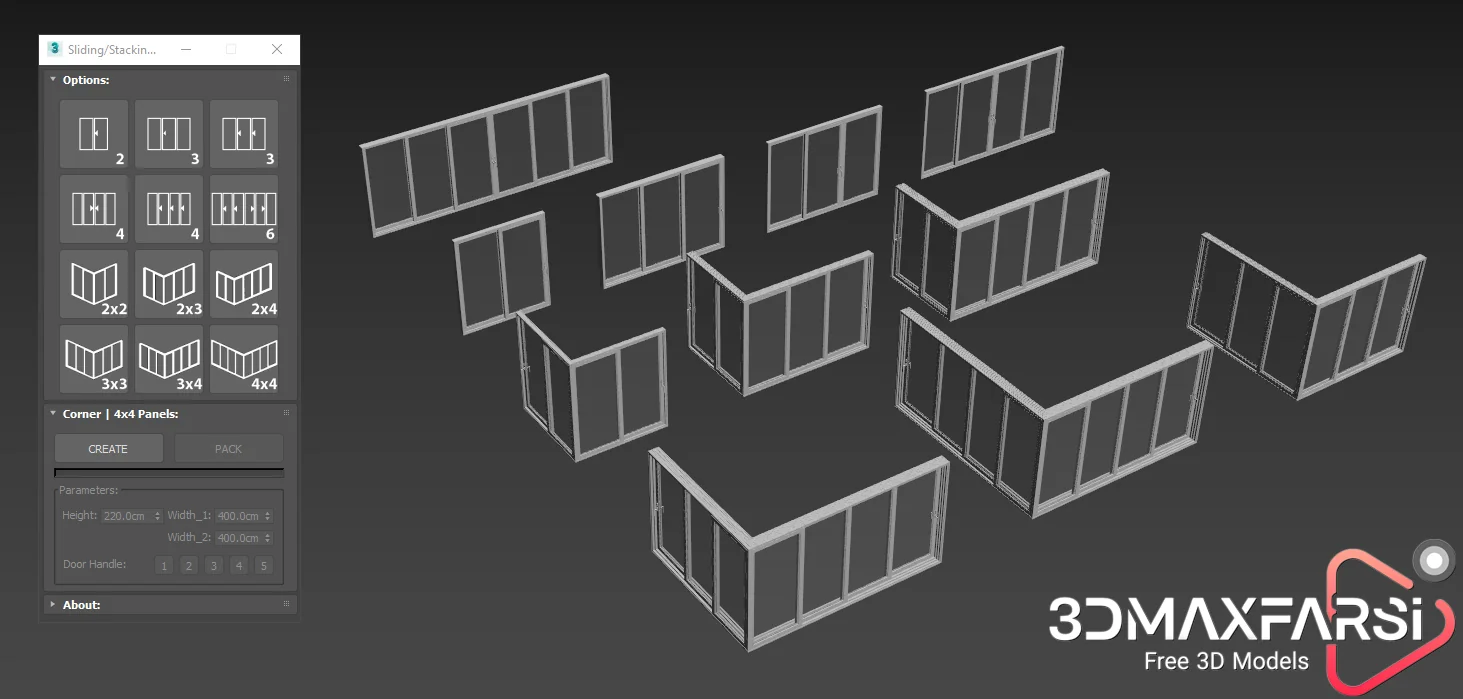
Simply put, the Sliding / Stacking Door Generator is a powerful script created by the talented Wuan Hyu. Its main superpower is efficiently creating highly customizable 3D models of sliding and stacking doors directly inside 3ds Max.
The best part? It is packed with many different styles of windows and door configurations. Whether you need a sleek modern patio door for a villa or a series of stacking doors for a commercial shopfront, this script has you covered. It applies flexibly to all sorts of Archviz projects and, most importantly, saves 3D artists like you and me a ton of time. ⏳💪
Main Features You Will Love ❤️
Here is a quick rundown of what you get with version 2.0:
-
Script Name: Sliding / Stacking Door Generator
-
Version: 2.0
-
Author: Wuan Hyu
-
Compatibility: 3ds Max 2016 and higher
-
System Unit Setup: Centimeters 📏 (This is super important, so don’t miss it!)
-
Key Benefit: Instantly generates parametric sliding and stacking doors with multiple style options.
How to Install the Script ⚙️
Installing scripts in 3ds Max can sometimes feel tricky, but this one is straightforward. The best way to run it is by simply dragging and dropping the script file directly into your 3ds Max viewport. Alternatively, you can go to the top menu, click on Scripting > Run Script, and then select the file. That’s it! You are ready to roll.
How to Use the Sliding / Stacking Door Generator: A Friendly Guide 🛠️
Okay, let’s get to the fun part – actually creating some doors! This script is quite intuitive, but there are a few golden rules you MUST follow to avoid glitches. Trust me on this! ☝️👀
Step 1: Check Your Units, Seriously! 📐
Before you even think about running the script, go to Customize > Units Setup and make absolutely sure your System Unit Setup is set to Centimeters. If you skip this, the generated doors might look completely crazy and out of scale. So, centimeters, always!
Step 2: Start with a Clean Scene is the Pro Tip 🌟
The original creator gives a fantastic tip: the absolute best way to use this script is on clean, empty scenes. It helps avoid any weird coordinate conflicts and keeps everything running smoothly. Think of it as giving the script a fresh, clean canvas to paint on.
Step 3: Generate Your First Door ✨
Run the script, and a parametric door will magically appear! You can then play with the various settings and styles in the script’s interface. Feel like changing from a 2-panel slider to a 3-panel stacking door? Just tweak the parameters. It is incredibly satisfying to see the changes happen in real-time.
Crucial Rules to Remember: The “Don’t Do This!” List 🚫
This is the most important section, my friend. Follow these rules like your 3D life depends on it, and you will have a flawless experience.
-
Rule 1: Don’t Move the Object While Editing Parameters!
When you are in the middle of tweaking the door’s settings, do not, I repeat, DO NOT move the door object around your scene. Finish your edits first. -
Rule 2: Don’t Switch Tabs When Editing Parameters!
Stay on the script’s tab! Jumping between different tabs or rollouts within the script’s interface while a parameter is active can confuse it. Make your changes, finalize them, then you are free to click around. -
Rule 3: You Must “Convert to Poly” to Create a New Object ➡️🧱
This is a huge one. If you have finished one door and want to make a completely different one, you cannot just change the settings. First, press the “Convert to Poly” button (or manually convert it from the right-click menu). This “bakes” your current door into a static, editable poly object. -
Rule 4: Move the Old Object Away Before Creating a New One ↔️
After you have converted your first door to an editable poly, move it far away from the world origin (0,0,0 coordinate axis). Only then should you create a new door. If you don’t, the new object might overlap with the old one or cause calculation problems. So, bake it, move it, then make a new one.
Final Thoughts ✍️
The Sliding / Stacking Door Generator v2.0 is more than just a script; it is a massive time-saver that lets you focus on the creative parts of your project instead of tedious technical modeling. It is flexible, robust, and, once you learn its simple rules, an essential tool in your Archviz arsenal. Just remember the golden rules: use centimeters, work in a clean scene, and convert your objects before making new ones.
Happy rendering, and may your archviz projects always be stunning! 🏠✨

![[Free] Chaos V-Ray 7.40.02 3ds Max 2020-2026](https://3dmaxfarsi.com/wp-content/uploads/2025/08/vray-7-for-3ds-max-390x220.webp "Chaos V-Ray 7.40.02 3ds Max 2020-2026 3")