3d-kstudio – Spline Flow Pro v0.9.166.96 for 3ds Max
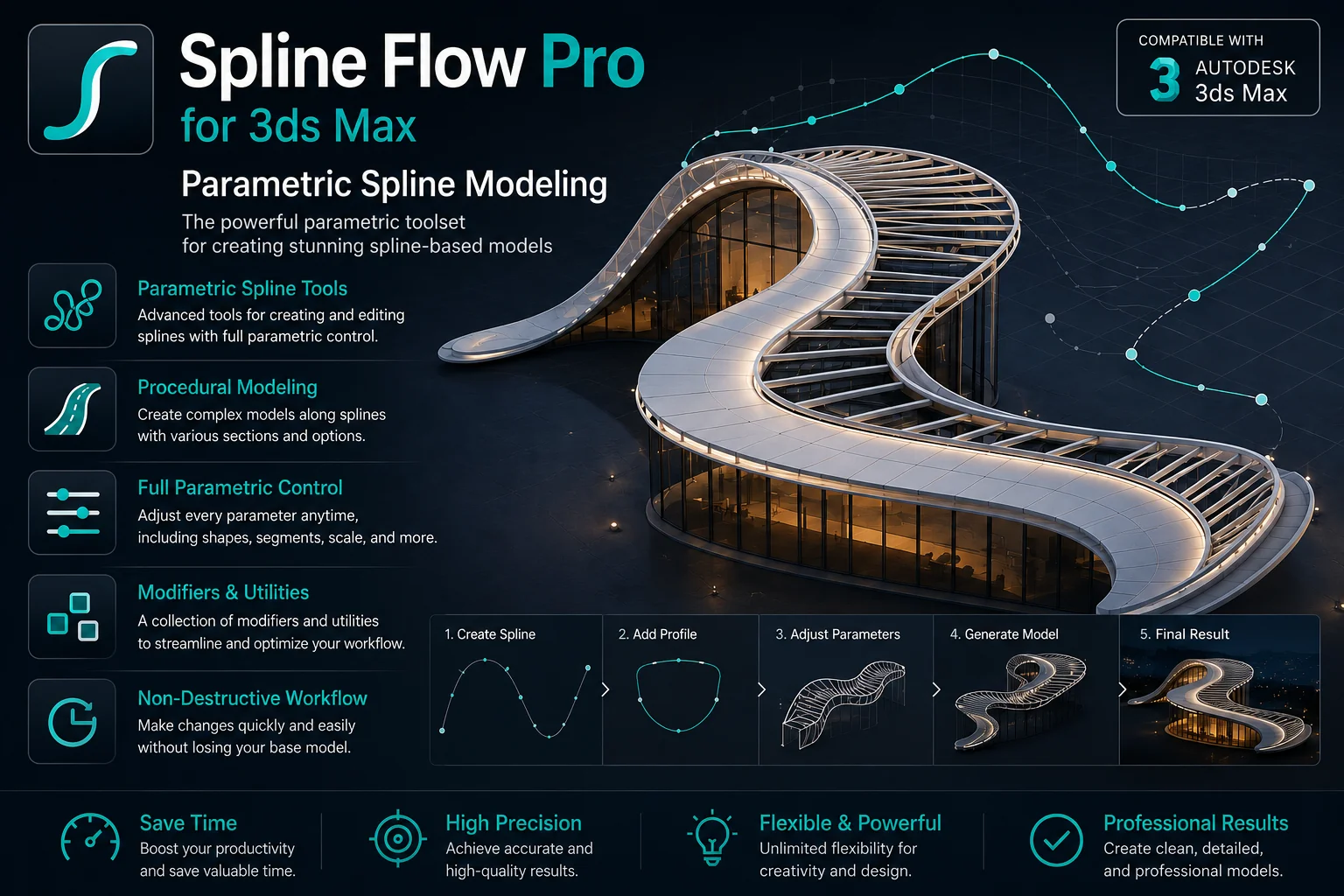
Download 3d-kstudio – Spline Flow Pro v0.9.166.96 for 3ds Max 🎨
Have you ever felt like pulling your hair out trying to model complex, flowing organic structures in 3ds Max? 🤯 We have all been there. Creating those smooth, intertwined details manually can take hours and often still doesn’t look quite right. But guess what? There is a game-changing plugin that turns this nightmare into a dream, and it is called Spline Flow Pro by 3d-kstudio.
In this friendly guide, we are going to dive deep into what makes Spline Flow Pro v0.9.166.96 so special. Think of this not just as a download page, but as your quick-start tutorial to mastering fluid, parametric design. Let’s jump right in! 🚀
3d-kstudio – Spline Flow Pro v0.9.166.96 for 3ds Max
This content is restricted to paid subscribers
What Exactly is Spline Flow? 🤔
Let’s keep it simple. Spline Flow is a fantastic plugin for 3ds Max that takes the pain out of creating intricate parametric objects. Its superpower is working with splines that smoothly transition from one shape to another.
Imagine you want to create a twisted vase, a complex lattice structure, or a bundle of cables that morph beautifully into a connector. Instead of manually adjusting every single vertex, Spline Flow lets you define a path and a few target shapes. The plugin does the heavy lifting, generating interconnected splines that flow seamlessly. It is like having a magic wand for parametric modeling! ✨
Creating Flowing Splines Along a Path 📍
So, how does the magic actually work? The core concept is beautifully straightforward. Users can effortlessly generate interconnected splines that follow a defined path. You are in complete control of their distribution and curvature.
Here is a simple breakdown of the workflow:
-
Create a Path: Draw a single spline that will act as the backbone of your object.
-
Define Your Profiles: Create one or more spline shapes (like a circle, star, or custom shape) that you want to be used along the path.
-
Let it Flow: With Spline Flow Pro, you pick your path, add your profiles, and instantly see how one morphs into the other along the journey. You can control how many intermediate splines are generated and how sharply they transition, giving you incredible precision without the headache.
Adding Life with Animation 🎬
Now, here is where things get really exciting. Spline Flow is not just for static design. This clever plugin allows you to animate parameters, adding dynamic elements to your creations. Just imagine the possibilities:
-
A futuristic tunnel that pulses and twists organically.
-
A product design visualization where components smoothly morph between different ergonomic shapes.
-
An abstract logo animation that resolves into a final form from a flowing ribbon.
By simply turning on the Auto Key button and changing a few sliders over time, you can bring your designs to life. This feature alone makes it a secret weapon for motion graphics artists and anyone looking to add a “wow” factor to their 3D portfolio. 🤩
A Modular and Flexible Workflow 🧩
One of the biggest fears with complex plugins is that they will bog down your scene or be a nightmare to edit later. Spline Flow eliminates that fear with its modular approach. This offers amazing flexibility, enabling you to visualize your final 3D models and their modifications with ease.
Think of it as a non-destructive workflow. You can change the original path or the profile shapes at any time, and the entire result updates instantly. You are not baking geometry until you are 100% happy. This freedom to experiment and tweak on the fly makes the design process feel playful and intuitive, rather than technical and rigid. You can stack modifiers, add materials, and see the final shaded result in real-time, making the creative process a pure joy. 🎉
Spline Flow in Action: Who is it For? 💡
Spline Flow simplifies the design process so drastically that it has become a valuable asset for a wide range of creative professionals:
-
Architects: Easily create complex facades, parametric lattices, ornate fencing, or bespoke stair railings that would be nearly impossible to model manually.
-
Product Designers: Perfect for crafting ergonomic grips, intricate bottle textures, and the complex tubing you see in modern furniture or high-tech gadgets.
-
3D Modelers & Animators: An indispensable tool for generating high-quality assets for games and cinematics, from alien tendrils to futuristic city infrastructure, not to mention the animation capabilities for VFX.
Ready to stop fighting with vertices and start creating breathtaking, flowing designs in minutes? This is your chance. Spline Flow Pro v0.9.166.96 is ready to supercharge your 3ds Max toolkit. Download it today and unlock a whole new world of parametric possibility!



![[Download] Camera Resolution Mod for 3ds Max](https://3dmaxfarsi.com/wp-content/uploads/2026/07/camera-resolution-mod-3ds-max-free-download-390x220.webp "[Download] Camera Resolution Mod for 3ds Max 5")